
360° Construction Documentation
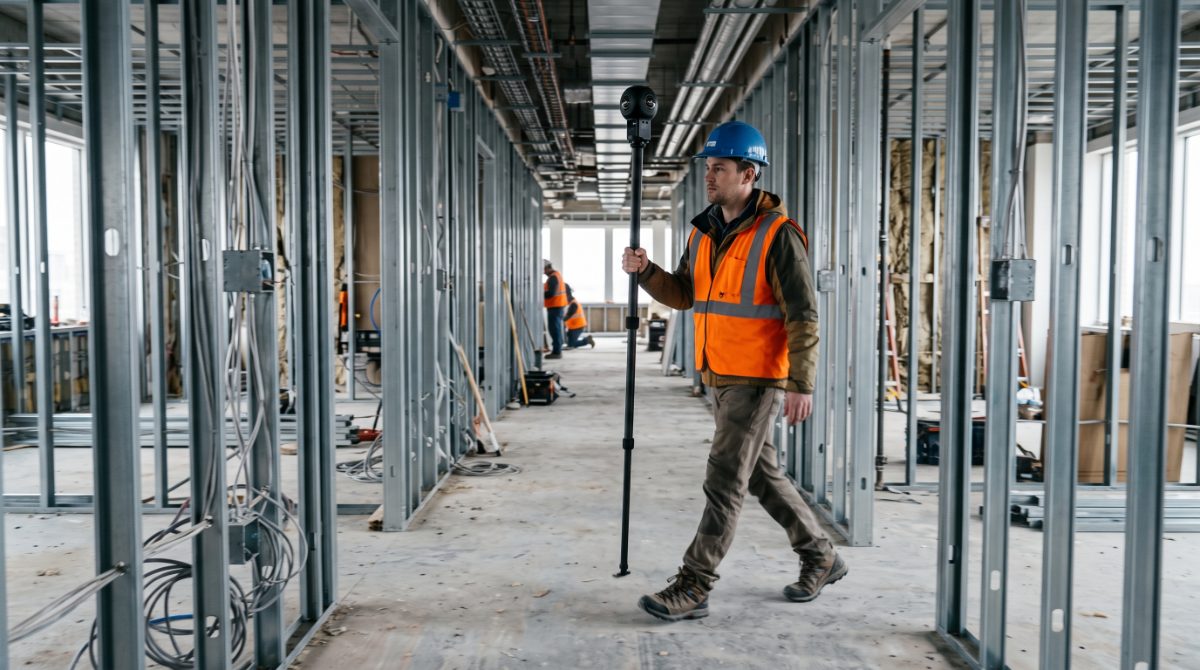
A technician walks the floor plate with a 360 camera. The result is a navigable walkthrough pinned to the plan, captured again on a fixed cadence so you can move backwards through time.
- What it costs
- Available within Kinetic programs and qualifying project scopes
- Also called
- 360 walkthrough · 360 camera · virtual walkthrough · interior documentation · site walk · OpenSpace-style capture
Where it earns its keep
Use it for these.
If your problem is “i need inside the building, on a cadence,” this is the answer.
- Frequent interior documentation at volume
- Remote walkthroughs for anyone not on site
- Repeated floorplates — multifamily, hospitality, healthcare
- The cover-up window, before drywall closes
- Punch and closeout reference
Don’t use it for this
Whole-site exterior coverage, which is a flight, and dimensional measurement, which is scanning. A 360 record shows what was visible; it is not a laser scan and carries no dimensional guarantee.
We put this on every service page because the fastest way to waste your money is to buy the impressive tool instead of the correct one. If the row above describes your job, say so on the call and we’ll point you at the right one — including when it’s cheaper than this.
Find the right one by problem →What you receive
And what it opens in.
- Time-stamped, location-organised 360° visual record of the agreed project areas
- Association to drawings, capture path, location and date where the platform supports it
- Capture dates, areas covered and any area that could not be reached
Included every time
Formats
Web viewer · Equirectangular stills
Format is agreed against what you do with the data next — these are the ones this service commonly delivers in, not a promise of every format on every project. Delivered to a shared project folder anyone on the job can open: no accounts, no per-seat charge, and if you leave, the record leaves with you.
The boundary
Where this scope ends.
Options on this scope
- Fixed-point 360 panoramas at nominated locations
- Targeted 2D photos alongside the walkthrough
- Date-to-date comparison sets
- Image or PDF reports
- Shared folders and stakeholder views
- Hosted access
- Offline archive where the source platform supports one
A separate Kinetic service
- Construction Photo DocumentationTargeted stills where one specific condition matters more than immersive coverage.
- Visual Closeout & Project ArchiveOrganising this record into a durable handover once the project and its platform workflow end.
- Design vs. Installed VerificationHolding captured conditions against the coordinated model. A walkthrough documents; comparison verifies.
- 3D Laser ScanningWhen the question is dimensional. A 360 record is imagery, not measured geometry.
- Scan-to-BIMWhen a structured model of the existing conditions is what is actually needed.
Not something Kinetic does
- Professional or code inspection
- Engineering certification
- Code-compliance certification
- Commissioning
- Certification of percent complete, payment entitlement or installed quantity
Where a project needs one of these, we say so and point you at someone licensed to do it.
Before it can be scheduled
One question that changes the answer.
Permission to capture
Do you have authority to authorise visual capture on this site?
Kinetic confirms the customer owns or lawfully occupies the site, or has authority from whoever does, before capture begins. A 360 capture records everything in view, so it also settles what is out of scope: occupied areas, and any space where people reasonably expect privacy, are planned around rather than captured and edited afterwards.
Before we can price it
What we’d ask you.
Kinetic confirms the scope with you before anything is scheduled. None of it is a form to fill in — it is what the conversation covers.
- What will this record be used for?
- Which areas and floors, and how much of each?
- One-time, on a cadence, or triggered by milestones?
- Do you have current floor plans we can associate the capture with?
- Does anything need to be captured before it is covered?
What changes the size of the job
- Site size
- Number of floors and zones
- Capture type
- Cadence
- Milestone count
- Project duration
- Platform and hosting
- Reporting
- Site access
- Travel
- Archive requirements
- Integration requirements
Useful to have, none of it required to start
- Project location
- Current floor plans or drawings where available
- Capture areas and floors
- What the record will be used for
- Cadence, or the milestones to capture
- Access constraints — occupied areas, working hours, confined or above-ceiling spaces
- Your authorisation for visual capture on this site
- Preferred platform or integration where one applies
- Any owner or client archive requirement
Where we run it
Markets this shows up on most.
Data centers
Schedule-critical, spatially large, and watched by people who are never on site. Recurring documentation across earthwork, steel, MEP, equipment pads and commissioning.
Reality capture for data center constructionIndustrial & logistics
Large footprints, tight schedules, and tilt-wall and roofing sequences that reward exact repeat coverage from the same flight path.
Industrial documentation workflowsMultifamily
Repeated floorplates and hundreds of units make interior 360 history and pre-close documentation worth more than they look. Less glamorous, rewards discipline.
Multifamily documentationAviation & transportation
Long programs, staged handovers and heavy reporting obligations. Airspace here is genuinely complex and it is planned for, not discovered on the day.
Aviation & transportation projects
What this runs with.
All services →Aerial Mapping & Photogrammetry
The exterior half of the same record, flown on the same cadence.
View pricing and build your project3D Laser Scanning
When you need dimensions off the space rather than a photograph of it.
Quoted per scopeConstruction Photo Documentation
Targeted stills where a specific condition matters more than immersive coverage.
Quoted per scopeVisual Closeout & Project Archive
What the record becomes once the project ends and the platform workflow does too.
Quoted per scope
Tell us the job. We’ll tell you if this is the right tool for it.
Send the project — an address, a schedule, or just what you’re trying to document. A person reads it and comes back with an approach and a price.
Scope your project